Buying & Paying
In this section you will find links, tools and information to help determine the best purchasing and payment methods for goods and services. Following Dartmouth College purchasing and payment guidelines will help ensure that you receive Dartmouth-negotiated rates for goods and services, while remaining compliant with purchasing policies and guidelines.
Business Expense Policy
The Business Expense Policy provides specific requirements for Dartmouth College business expenses. An allowable business expense is defined as necessary, reasonable, appropriate non-compensation expense incurred for a valid business purpose to fulfill the mission of Dartmouth College. The Business Expense polices also identify the documentation required to substantiate requests for payment. These policies are necessary to ensure the proper use of Dartmouth resources and compliance with federal and other external regulations.
Procurement and Payment Methods
The Procure-to-Pay Portal can assist in identifying and selecting current, contracted and preferred institutional suppliers by purchasing category, business expense, or classification.
A Purchase Order, or "PO," defines the terms on which goods or services are purchased.
The PO Policy is intended to set out when a PO is required, and when a PO will not be required,
in order to complete a purchase of goods or services. Because the PO is intended to
evidence the commitment between Dartmouth and a vendor, it is important that where
a PO is required, it be issued in advance of delivery of the goods or services purchased.
Procurement guidelines have been established to promote competitive bidding. The Procurement
Sole Source/Competitive Bid Policy outlines the requirements for competitive bids on goods and services purchased by
Dartmouth College.
The Dartmouth Procurement Card (PCard) program is designed to improve efficiency in
processing low dollar value purchases ($4,999 or less). The PCard is a Visa card and
can be used to make purchases for goods and some limited services. Review the comprehensive
P-Card policy for more details.
Purchase Requisitions/Purchase Orders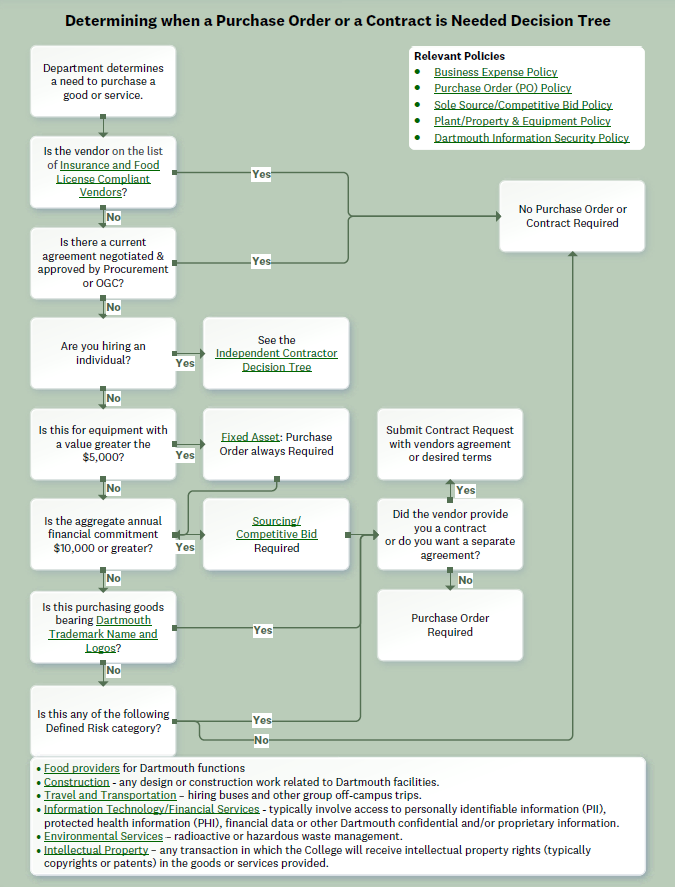
- If a purchase order is required and you have access to eProcurement, create a Purchase Requisition
- Otherwise, complete the Purchase Request eForm (and additional forms if required) for processing. Your Finance Center will create a purchase requisition and your order will be placed with the vendor.
Contracting
- When engaging an individual, the vendor has provided you their form of agreement, or when Dartmouth requires an agreement, the agreement must be submitted in the Agiloft Contract Management System. Note: Personal email addresses, such as Gmail or Yahoo!, should not be used when entering into contracts on behalf of the institution.
Invoice Processing
Paying Invoices and Internally Generated Payments
- All invoices that need to be processed for check or international wire payment, should be emailed to invoice@dartmouth.edu or a Payment Request eForm must be created.
- Honorariums*, Fellowship/Scholarship payments or other payments to students or non-employees should be processed through the Payment Request eForm as an “Other Payment”. *Note: Honorariums must be submitted with the Honorarium Acceptance Form. See "Hiring Independent Contractors & Guests" for more information.
New vendors require an invitation to PaymentWorks. This invitation will be initiated when a new vendor is identified on a Purchase Requisition in eProcurement, Contract Request in Agiloft, Payment Request eForm, or when the Independent Contractor Questionnaire is submitted to Procurement Services.
Role of Procurement Services
The Procurement Services team is responsible for the systems, processes, and support for sourcing, contracts, purchases, and payments across the campus necessary to enable Dartmouth’s mission. We provide the resources for sourcing and contracting and provide guidance and advice to improve the effectiveness of standard agreements, purchase requisitions, purchase orders, credit cards, and non-PO payments. We strive to optimize the value of purchases through leveraging technology, analytics, risk mitigation, and best practices in collaboration with our campus partners.Individuals are encouraged to contact Procurement Services with questions or requests for assistance.
Receiving Goods
Dartmouth College does not have a central receiving location. The College does have several loading dock areas able to receive truck deliveries such as Central Stores Receiving located at 56 Etna Road, Vail Loading Dock, Borwell Loading Dock, and the Burke Loading Dock. Purchases of large equipment may need to be delivered to the Central Stores Receiving location.Prior knowledge of these deliveries would be helpful for the Central Stores receiving personnel. Departments will need to contact FO&M to have the equipment delivered to the actual destination. There will be a charge from FO&M for this delivery.
Procurement Code of Ethics
Purchasing professionals and those transacting incidental purchases must have a highly developed sense of professional ethics to protect Dartmouth's reputation for fair dealing. To strengthen ethical awareness, and to provide guidelines for our staff, Procurement Services has long promoted the National Association of Educational Procurement's Code of Ethics:
- Give first consideration to the objectives and policies of my institution.
- Strive to obtain the maximum value for each dollar of expenditure.
- Decline personal gifts or gratuities.
- Grant all competitive suppliers equal consideration insofar as state or federal statute and institutional policy permit.
- Conduct business with potential and current suppliers in an atmosphere of good faith, devoid of intentional misrepresentation.
- Demand honesty in sales representation whether offered through the medium of a verbal or written statement, an advertisement, or a sample of the product.
- Receive consent from originator of proprietary ideas and designs before using them for competitive purchasing purposes.
- Make every reasonable effort to negotiate an equitable and mutually agreeable settlement of any controversy with a supplier; and/or be willing to submit any major controversies to arbitration or other third party review, insofar as the established policies of my institution permit.
- Accord a prompt and courteous reception insofar as conditions permit to all who call on legitimate business missions.
- Cooperate with trade, industrial and professional associations, and with governmental and private agencies for the purpose of promoting and developing sound business methods.
- Foster fair, ethical and legal trade practices.
- Counsel and cooperate with NAEB members and promote a spirit of unity and keen interest in professional growth among them.
Government Research and Contracts
There are several areas subject to Federal audits when the use of government funds are involved in College purchases. Information concerning these areas may be found by visiting Office of Management and Budget Uniform Guidance.
Last Updated